






Planning an international trip can be exciting, but finding affordable flights often takes time and patience. Travellers must compare airline prices, check departure times, consider baggage fees, and decide which booking provider offers the best value. With so many options available online, organising a trip can quickly become overwhelming.
Table of Contents
Skyscanner is a travel comparison platform designed to make this process easier. It allows users to compare flight prices from different airlines and travel providers. Travellers can also explore hotel options and car rentals, making it a useful starting point for organising holidays, business trips, and international adventures.
Whether you are planning a weekend getaway, a family holiday, or a long-distance journey, Skyscanner can help you explore different travel options before making a booking. This guide explains how the platform works, its main features, its benefits and limitations, and how travellers can use it more effectively.
What Is Skyscanner?
Skyscanner is an online travel search and comparison platform that helps people find travel options through a single search. Instead of visiting multiple airline websites individually, users can compare available flights and prices from participating providers.
The platform also offers searches for accommodation and car rentals. This can help travellers organise several parts of a trip without starting their research from scratch on different websites.
One important point is that Skyscanner generally operates as a travel metasearch engine rather than a traditional travel agency. It compares offers and directs users to the airline, online travel agency, hotel provider, or other partner to complete their bookings.
According to its official website, Skyscanner compares travel options from a large network of providers and offers tools such as price alerts and flexible-date searches. However, the results may not include every provider or every available deal.
How Does Skyscanner Work?
Using Skyscanner is relatively straightforward, even for first-time travellers. The process begins with entering basic trip details and comparing the results.
1. Enter Your Travel Details
Visit the Skyscanner website or open its mobile app. Select whether you need a one-way, return, or multi-city flight, where that option is available.
Enter your departure airport, destination, travel dates, and number of passengers. You can then start your search to see the available options.
For example, someone planning to travel from Delhi to London can compare different flight itineraries, departure times, airlines, and prices.
2. Compare Available Flights
Once the search results appear, review the options carefully. The cheapest ticket may not always be the most convenient choice.

Some flights have long layovers, inconvenient departure times, or additional charges for baggage and seat selection. Other options may cost slightly more but provide a shorter journey or a more suitable schedule.
Skyscanner allows travellers to compare options and use available filters to narrow their results according to their preferences.
3. Select a Booking Provider
After choosing a suitable flight, select the offer to continue to the relevant provider’s website. Depending on the itinerary, this may be an airline or an online travel agency.
Before entering payment details, check the final fare, baggage allowance, passenger information, cancellation rules, and any additional charges.
4. Complete Your Booking
The selected provider normally handles the payment, booking confirmation, and post-booking assistance. Travellers should save their confirmation email and booking reference for future use.
Because the booking is completed with the provider, it is important to understand that provider’s policies before paying.
Key Features of Skyscanner
Skyscanner offers several features that can make travel planning more convenient.
Flight Price Comparison
One of the platform’s main advantages is its ability to display flight options from different providers together. This helps travellers compare fares without opening numerous websites individually.

Users can consider price, journey duration, departure times, and stopovers when choosing an itinerary. Comparing these details can help them find an option that suits both their budget and schedule.
Flexible Travel Dates
Travellers who have flexibility in their schedules may benefit from whole-month or flexible-date searches, where available.
These tools can help users compare prices across different travel dates and identify potentially cheaper days to fly. This is particularly useful for people planning holidays several months in advance.
However, the displayed prices are indicative until confirmed with the booking provider. Actual fares can change as availability and demand change.
Explore Everywhere
Not every traveller has a fixed destination in mind. Some people simply want to take a holiday within a particular budget.

Skyscanner’s explore everywhere feature can help users discover destinations based on their departure location and travel preferences. It can be useful for finding inspiration for a city break, beach holiday, or international adventure.
For example, someone departing from Mumbai might use destination discovery tools to compare possible trips across Southeast Asia, Europe, or the Middle East.
Price Alerts
Flight prices can change frequently. Price alerts help users monitor selected routes and receive notifications when fares change.

Instead of repeatedly searching for the same flight, travellers can track a preferred journey and review updates before deciding when to book.
A price alert does not guarantee that a fare will fall. It simply helps users follow price movements and make more informed decisions.
Hotel Comparison
Skyscanner also provides hotel search options, allowing users to compare accommodation offers from participating providers.
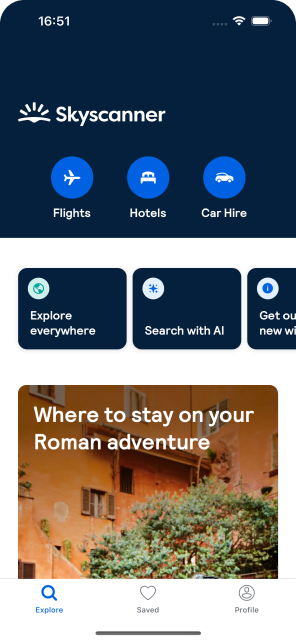
Travellers can review available properties, prices, locations, and other listing details. Before booking, they should check the total cost, taxes, cancellation conditions, guest reviews, and distance from important attractions.
Car Rental Search
For travellers who want to explore a destination independently, car rental comparison can be useful.
Users can search for rental vehicles at suitable locations and compare available offers. Before confirming a booking, it is important to check insurance coverage, fuel policies, deposits, mileage limits, and driving requirements.
Benefits of Using Skyscanner
Saves Time During Travel Planning
Comparing travel options across multiple websites can be time-consuming. Skyscanner brings offers from participating providers together, helping users review alternatives more efficiently.
Helps Travellers Explore Different Budgets
Not everyone has the same travel budget. Students, families, business travellers, and solo adventurers may have different priorities.
By comparing prices and itineraries, users can explore options that better match their spending limits and travel requirements.
Supports International Travel Research
Travellers planning trips abroad often need to compare several airlines, routes, and connecting airports. Skyscanner can simplify the initial research process by bringing multiple options into one search experience.
Offers Useful Planning Tools
Features such as flexible-date searches, destination discovery, and price alerts can help users make travel decisions with greater confidence.
These tools are especially helpful when the destination or travel dates are flexible.
Provides Access to Multiple Providers
Skyscanner connects users with participating airlines and travel companies. This gives travellers an opportunity to compare different booking options before choosing where to complete a purchase.
Limitations to Consider Before Booking
Although Skyscanner can be useful, travellers should understand a few limitations.
Prices are not guaranteed. A fare displayed in search results may change before the booking is completed. Always confirm the final amount with the provider.
Not every provider may appear. Skyscanner’s results are based on participating providers, so a direct search on an airline’s website may reveal another option.
The cheapest fare may have restrictions. Some low-cost tickets have limited baggage allowances, strict change policies, or additional fees. Compare the total cost rather than the headline price alone.
Customer support depends on the booking arrangement. If you complete a booking through an airline or travel agency, that provider generally handles payment, cancellations, and ticket changes. Contact the appropriate provider when you need assistance with an existing reservation.
Different itineraries require careful checking. Some results may involve separate tickets or multiple bookings. Review connection times, airport changes, baggage arrangements, and transit requirements before purchasing.
Understanding these points can help travellers avoid unexpected expenses and make better booking decisions.
How to Find Better Flight Deals on Skyscanner
Finding an affordable flight involves more than selecting the lowest price displayed on the screen. A few practical strategies can make the comparison process more effective.

Be Flexible With Your Dates
If your schedule allows, compare different departure and return dates. Travelling on a different day may reveal a lower fare, although savings vary by route and season.
Compare Nearby Airports
Some destinations have multiple airports within reasonable travelling distance. Check whether departing from or arriving at a different airport offers better overall value.
Remember to include the cost and time of ground transportation when comparing alternatives.
Set Price Alerts Early
If you are researching a particular route, use price alerts where available. Tracking a fare can help you understand how it changes over time.
Avoid assuming that prices will always decrease closer to departure. Availability, demand, and seasonal travel patterns can affect fares in either direction.
Review the Entire Journey
A flight with a lower ticket price may involve a long layover or additional expenses. Consider baggage, meals, airport transfers, and overnight accommodation where necessary.
The best option is the one that offers the right balance of price, convenience, and reliability for your journey.
Check the Final Price Before Paying
After choosing an offer, review the provider’s final booking page carefully. Confirm passenger names, travel dates, baggage allowance, taxes, and cancellation conditions.
For international journeys, also check passport validity, visa requirements, and transit rules using official government or airline sources.
Is Skyscanner Worth Using in 2026?
Skyscanner is worth considering for travellers who want to compare flights and explore travel options before booking. Its search tools can save time, while flexible-date searches and price alerts may help users identify fares that suit their plans.

It is particularly useful for budget-conscious travellers, people planning international holidays, and anyone comparing several routes or airlines.
However, it should be treated as a starting point for research rather than a guarantee of the lowest possible price. Comparing the final fare with the airline’s own website and checking all booking conditions remain important steps.
Ultimately, the value of Skyscanner depends on the route, travel dates, available providers, and individual requirements.
Frequently Asked Questions
1. Is Skyscanner free to use?
Yes. Travellers can search and compare available travel options without paying Skyscanner a search fee. The airline or booking provider may charge the cost of the selected ticket and any applicable extras.
2. Can I book international flights through Skyscanner?
You can search for international flights and compare available offers. When you select an option, you are generally redirected to the relevant airline or booking provider to complete the reservation.
3. Does Skyscanner guarantee the cheapest flights?
No comparison platform can guarantee that every available fare will appear in its results. Prices and availability change, and some providers may not be included. Compare the final fare with other relevant options before booking.
4. Can I find hotels on Skyscanner?
Yes. Skyscanner provides hotel search and comparison options for participating accommodation providers. Check the property’s terms and total price before confirming a reservation.
5. How can I track flight prices?
You can use price alerts for supported routes to receive updates when fares change. These notifications can help you monitor a journey, but they do not guarantee future savings.
Final Thoughts
Skyscanner offers a convenient way to research flights, compare travel options, and discover destinations for future holidays. Its flight comparison tools, flexible-date searches, price alerts, hotel search, and car rental options make it a useful resource for many types of travellers.
For the best experience, compare more than the headline fare, review the booking provider’s conditions, and confirm all details before paying. With a little preparation, travellers can use Skyscanner to make more informed decisions and plan international journeys that suit their budgets and schedules.